Case Tracker

Case Management Software

One Platform. Zero Busywork.

Case Tracker is the software configured to your organization’s policies and procedures — not a generic set of phases. Every workflow, timeline, and alert is automated so your team spends less time stressing over administrative burden and more time focusing on what you do best.

colleagues looking at a tablet screen together

Built for Equity Work

Case Tracker is the premier practitioner-developed case management system created specifically for Title VI, Title VII, Title IX, and ADA/504 casework in higher education and PK-12.

Tracking, documentation and workflow challenges? Solved.

As working equity professionals, we created Case Tracker to be the tool we always needed to get the job done efficiently and compliantly — no more forcing a software to do the work it wasn’t intended for.

More Features Unique to Case Tracker

Case Tracker removes the guesswork from compliance.
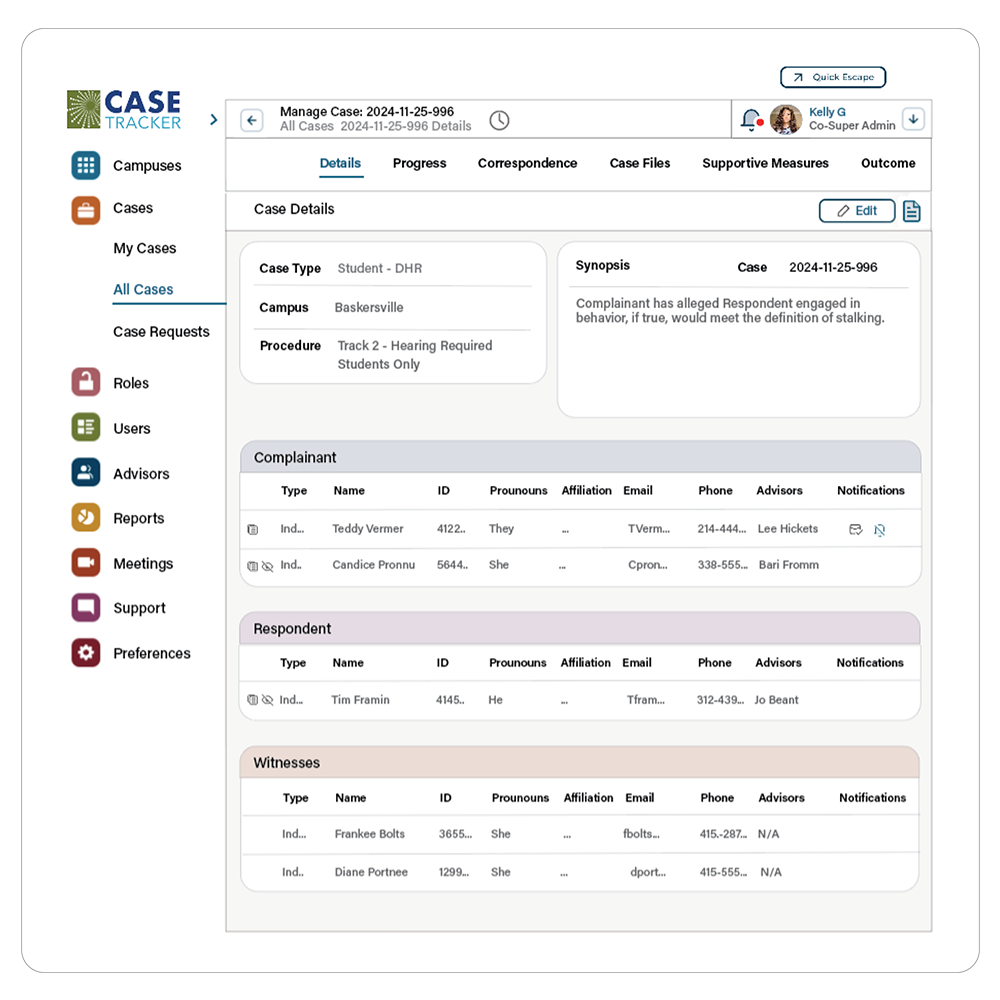
Case Tracker software dashboard

All-In-One Platform

  • Configured to support Title VI, Title VII, Title IX, and ADA/504 — tracks cases for students, faculty, and staff.
  • Secure correspondence, status updates, and role-specific file sharing — including videos, photos, documents, investigation and hearing reports, and more.
  • Integrated communication lets all stakeholders schedule, correspond, and upload evidence files.
  • Native data visualization transforms complex data into clear reports, so users can quickly access analytics on key metrics and emerging trends.
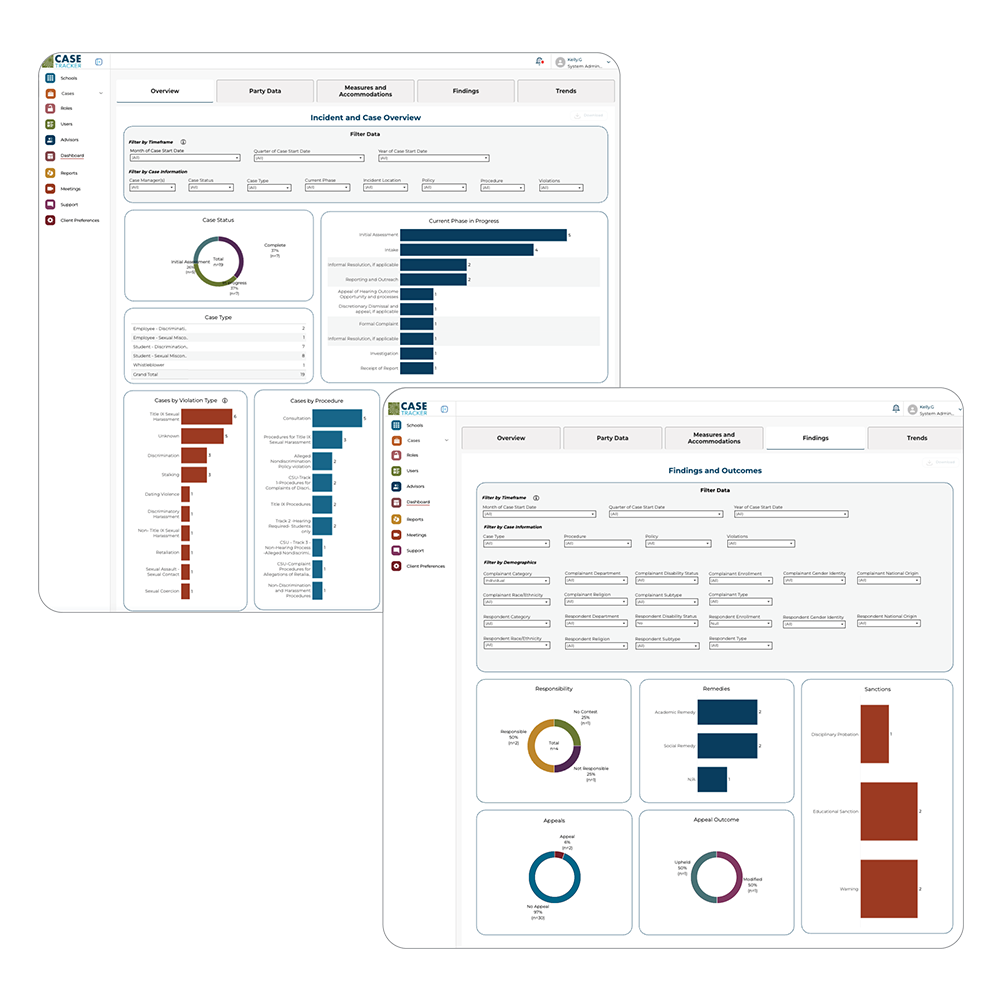
case management software screenshots

Configurable Access Levels & Seamless Collaboration

  • Pre-set access levels allow colleagues to gather the information they need—case status, documents, data and reports — based on their role.
  • Role-based permission levels give stakeholders access to the communications and files relevant to their role, automatically linked to the correct case.
  • When personnel go out on leave, transition to a new job, or take a vacation, with just a few clicks you can select entire cases and transfer them to another team member.
  • Transferred case content — timelines, documents, correspondence, supportive measures, disability accommodations, do-not-disturb preferences — is on the selected dashboard instantaneously.
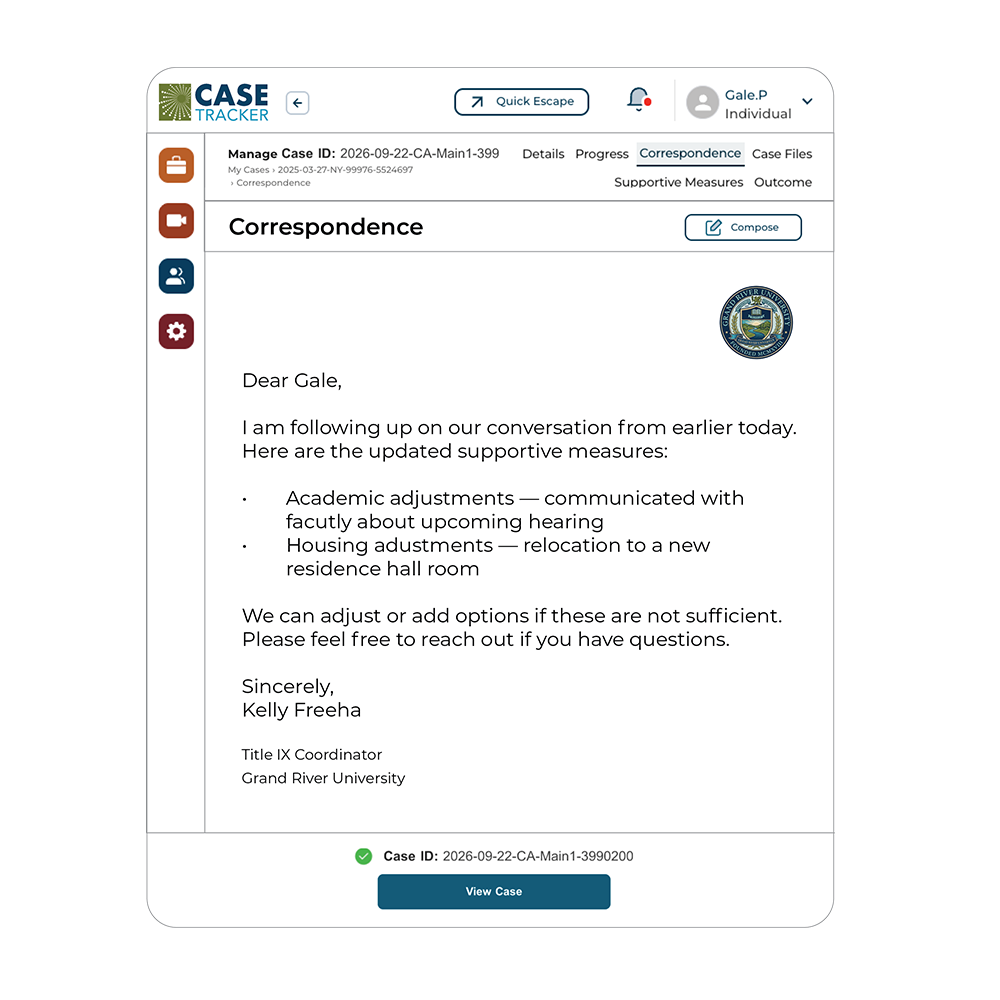
equity case management software

Updates for Parties — When They Want Them.

  • Live updates give parties 24/7 visibility into their case.
  • Contact preferences let parties protect their own privacy and comfort.
  • Communication preferences let parties choose how and when they and their advisors receive information.
  • Secure storage gives parties convenient access to their communications history and case documents.
animated gif of Case Tracker app

A Mobile App

Secure Mobile App for Apple and Android — respond to requests, review case files, and stay on top of deadlines without running back to your desk.

Innovation that works for you.

Humans to help.

With Case Tracker, you don’t just get software. You get a partner who learns your needs and understands Title IX, Title VI, Title VII, and ADA/504 casework.

Stay ahead of regulatory change

Compliance obligations fluctuate—we keep track of changes in your region to inform you and provide corresponding edits to the protocol.

Optimize your workflows

Our team works with you to configure and refine workflows as your policies, procedures, or objectives shift.

Get support from experts who know the work

Our technical support team understands the nuance of equity and conduct casework, beyond just the software.

Everything you’d expect from an enterprise case management system, built in.

Incident reporting, investigation management, and secure documentation — all in one easy-to-use platform.

dialogue icon

Intake Reporting

Secure reporting from any device, anywhere, through accessible intake forms.

mobile device icon

Workflow automation and case routing

Automated case routing, task assignment, deadline tracking, reminders, and notifications.

pen icon

Configuration and flexibility

Build workflows, templates, and CSV / XLS reports without needing IT support.

mouse icon

Secure case management and documentation

A complete digital case record from intake through resolution, in a single secure systems.

writing icon

Enterprise scale and integrations

Scales to organizations of any size, integrates with HRIS, SIS, ERP, and authentication systems, and supports multiple departments operating within a shared environment.

analytics icon

Analytics, data and reporting

Centralized data with customizable metrics.

bar graph icon

Training and support

Institutional IT to Software IT communication. Support staff as needed. Guides, webinars, events, and user education, available online.

speedometer icon

Communication & collaboration

Document sharing and notifications keep every stakeholder coordinated.
dialogue icon

Security, permissions and access controls

Protect sensitive information with role-based permissions, restricted case types, and SOC 2–certified security.

SOC 2 Certification

Everything you’d expect from an enterprise case management system, built in.

Incident reporting, investigation management, and secure documentation — all in one easy-to-use platform.

dialogue icon

Intake Reporting

Secure reporting from any device, anywhere, through accessible intake forms.

mobile device icon

Workflow automation and case routing

Automated case routing, task assignment, deadline tracking, reminders, and notifications.

pen icon

Configuration and flexibility

Build workflows, templates, and CSV / XLS reports without needing IT support.

mouse icon

Secure case management and documentation

A complete digital case record from intake through resolution, in a single secure systems.

writing icon

Enterprise scale and integrations

Scales to organizations of any size, integrates with HRIS, SIS, ERP, and authentication systems, and supports multiple departments operating within a shared environment.

analytics icon

Analytics, data and reporting

Centralized data with customizable metrics.

bar graph icon

Training and support

Institutional IT to Software IT communication. Support staff as needed. Guides, webinars, events, and user education, available online.

speedometer icon

Communication & collaboration

Document sharing and notifications keep every stakeholder coordinated.

dialogue icon

Security, permissions and access controls

Protect sensitive information with role-based permissions, restricted case types, and SOC 2–certified security.
SOC Certification

Tight budgets should not compromise equity.

Like you, we believe every student and employee deserves equal access to their learning and working environment — regardless of their institution’s size or resources.

Trauma-informed by design.

Predictability and agency matter. Case Tracker brings more transparency to the process with live case updates, in-app correspondence and scheduling, providing students, staff, and faculty with information they need so they can better plan their lives knowing they haven’t been forgotten.

Priced for universal access.

That kind of care shouldn’t be out of financial reach — our pricing reflects our commitment to affordability.

Ready to See Case Tracker in Action?

Case Management Resources

Why Communication Protocols Matter

Learn why strong communication protocols help investigators create fair, accessible, consistent, and respectful investigation processes. | View Article

Institutional Risk Reduction Checklist

What Insurers Wish Institutions Knew About the Risks of Sexual Misconduct. | Download

Case Management Best Practices

Learn about the essentials of case management and what should be included in a file. | Download

Managing Equity and Conduct Offices in our Current Climate

National experts Peter Lake and Jody Shipper share how institutions can navigate the ever-changing compliance obligations under Titles VI and VII of the Civil Rights Act of 1964, and Title IX of the Education Amendments of 1972.  | Download

Frequently Asked Questions

Case Tracker is a case management platform built specifically for equity and compliance work in higher education and PK-12 settings. Using one centralized system, the software helps institutions manage reports and cases related to Title IX, Title VI, Title VII, ADA/504, discrimination, harassment, bullying, student conduct, employee relations, and other civil rights or compliance matters.

This practitioner-designed software uses automated workflows to help institutions:

  • Create more consistent case treatment across teams and offices
  • Improve reporting with built-in data analysis
  • Reduce administrative burden through streamlined processes
  • Securely manage and store sensitive case information, while providing appropriate transparency to the community

Case Tracker is different in five key ways:

  • Practitioner-designed workflows: Processes are automated around an organization’s policies and procedures and specific steps rather than generic case phases.
  • Precision control: Permissions can be configured by case type, office, case assignment, and case section.
  • Agency, transparency, and ease for the parties: A dedicated portal brings communications, file sharing, status updates, alerts, and action items into the case experience.
  • Operational visibility: Automated timelines, action items, alerts, dashboards, and stakeholder access make work easier to manage and report on.
  • Practitioner-led support: The team helps optimize workflows, stays current with regulatory and compliance changes, and provides technical support informed by the nuance of the work.

Case Tracker is a good fit for practitioners managing complex equity and compliance work, including those in roles such as Title IX Coordinators, Title VI Coordinators, ADA/504 Coordinators, Deans of Students, General Counsel, Human Resources, employee relations, civil rights professionals, and other administrators responsible for sensitive cases in higher education and PK-12 settings. Organizations from PK-12 school districts to small liberal arts colleges to large institutions find that Case Tracker is the right tool to meet compliance needs and reduce staff stress.

Many schools rely on spreadsheets, email, shared drives, and separate file-sharing tools to manage and report on casework, creating a fragmented process. Case Tracker brings these functions together in one platform. Parties can communicate with investigators, Coordinators, and advisors and upload evidence and files directly in the app. Teams can track cases, manage files, follow workflows, and communicate with parties and colleagues using defined access levels—all while maintaining a single, complete case record. On-demand data visualization also makes it easy to share insights with managers and the broader community.

Case Tracker automates key operational steps, including:

  • Case routing
  • Task assignments
  • Deadline tracking
  • Step-by-step reminders and notifications
  • Timelines and action items
  • Dashboards and status visibility
  • Step-by-step intake and reporting workflows

By connecting these elements to the organization’s configured workflow, Case Tracker helps reduce manual coordination and gives teams a clearer view of what needs to happen next.

Case Tracker includes data visualization and dashboard capabilities that help institutions better understand case volume, trends, timelines, and other key metrics. Case Tracker’s proprietary data visualization makes it easier to move from manual compilation of data to real-time analysis, supporting oversight, strategic decision-making, and community-reporting needs.
Case Tracker uses automated workflows aligned to your policies and procedures to provide more consistent case management from intake through resolution, meaning every step is outlined and important deadlines are met. There is less reliance on one employee’s memory or institutional knowledge. Case Tracker offers continuity across staff transitions and gives new team members a defined structure.

Yes. Case Tracker supports automated workflows tied to your policies and procedures, helping teams follow a more consistent process, step by step, from intake through resolution. When staff are new to the work, covering unfamiliar responsibilities, or working to reduce errors that happen when process knowledge lives in multiple places, Case Tracker provides one platform that helps meet your compliance needs every step of the way.

Case Tracker provides automatic updates to each party through a dedicated, secure portal. Instead of relying on unsecured email, teams can track communication in real time and give parties a clearer view of relevant information.

Yes. Case Tracker includes a portal for parties that integrates their experience into the application. Depending on the organization’s configured process, the portal can support:

  • Secure communication
  • File sharing
  • Status updates
  • Alerts
  • Action items
  • Convenient access to communications history and sensitive documents

This creates a more coordinated experience without requiring the organization to manage the party experience through disconnected channels.

Case Tracker provides precise access controls based on:

  • case type
  • office
  • campus
  • case assignment
  • case section

Permission settings are flexible and can be optimized to reflect how the organization structures its work, supporting appropriate confidentiality while allowing authorized users to access the information they need.

Case Tracker provides 24/7 access for leadership and stakeholders to view dashboards and case status, based on the access configuration established by your office. It also provides centralized data and metrics, making reporting easier and safer while reducing the need for manual status collection and ad hoc updates.

Case Tracker includes the standard capabilities expected from an enterprise-grade case management system — intake reporting, workflow automation and case routing, configurable templates and reports, secure documentation, role-based permissions, analytics and reporting, enterprise integrations (HRIS, SIS, ERP, and authentication systems), and ongoing training and support. See “Everything You’d Expect from an Enterprise Case Management System, Built In” above for the full breakdown.

Yes. Case Tracker is designed to support organizations of any size and enables multiple departments to operate efficiently within a shared environment. Its configurable workflows, case types, offices, permissions, reporting, and integrations allow organizations to create a consistent platform structure while preserving the distinctions between teams and types of work.
Case Tracker support goes beyond technical troubleshooting. The team helps organizations optimize workflows and provides technical assistance from people who understand the nuance of the underlying work. Organizations also have access to online training resources, including guides, webinars, events, and user education, to support adoption and ongoing learning.

Yes — go to the Case Tracker IT page.

Case Tracker’s intake forms are configurable to your institution’s policies, which can include anonymous reporting options where your procedures call for them. Reports can be routed, tracked, and managed with the same permissions-based confidentiality controls used across the rest of the platform.
Case Tracker’s role-based permissions, restricted case types, and secure documentation are designed to help institutions manage sensitive student records in line with confidentiality obligations like FERPA.
Yes. Because workflows are configured around your institution’s own policies and procedures rather than a fixed set of phases, Case Tracker can support a range of grievance and misconduct processes — including employee relations, student conduct, and other formal complaint or grievance procedures — within the same secure system.
Case Tracker’s tiered licensing is based on your institution’s structure, scope, and operational needs, so schools and districts with smaller budgets can access the same compliance benefits, reduced risk, and lighter administrative burden as larger institutions. Basic annual licenses start at $4,000. Our specialists will work with you to determine the right package for your organization.